Showing posts with label Custom ROMS for galaxy y. Show all posts

Wednesday, 9 October 2013

// // Leave a Comment

Creed's ROM 3.5 for Galaxy Y


What's new:-
✔ All the Major
Problems Fixed
(USB Lockscreen
Problem + Signal
Bars Problem)
✔ New UI Inspired
from both Touchwiz
and ICS
✔ Improved Status
Bar Mods
Battery Bar Options
✔ Options to Choose
Battery Bar Height
Battery Bar Color/
Transarency
✔ Customizable
Signal/Battery Text
Options
✔ Custom Fonts
Available for Clock
and Signal Texts
✔ New Improved
Touchwiz Launcher
(Full Credits : zcop)
✔ 5 Docks With
Landscape Support
✔ System
Performance
Improves
✔ New Animations
✔ Much More Stable
than Previous
Versions
✔ Improved MMS app
with theme support
✔ No Receipient limit
on Message App
✔ No Auto SMS to
MMS Coversion

--------------------------------------------------

Download:
Creeds ROM v3.5

-------------------------------------------------

Installation:
1. Download the Rom zip File
2. Copy it to Sdcard Directly
3. Power Off the Phone
4. Boot into recovery by pressing
(Vol. Key Up + Home Key + Power
Key)
5. Do a Data RESET
6. Select Install Zip From SdCard
7. Choose the rom zip
8. Install
9. Reboot

---------------------------------------------------

XDA THREAD:-
http://forum.xda-developers.com/showthread.php?t=1636983

Read More

Saturday, 5 October 2013

// // Leave a Comment

[ROM][CM7][PORT] Optimus Nexus Me v5 for Galaxy y


Here, is new ROM based
completely (for now) on a port
of Optimus Nexus Me v5.
Based on CM7 by Percy Gahlot

FEATURES:-
✔ System thoroughly edited
✔ Improved battery performance
✔ Jelly Bean 4.2 Status Bar style
✔ ICS/Jellybean like Task Switcher
✔ Jellybean style settings with
categories
✔ Changes in various applications
and framework to maximize
appearance JB
✔ Animations JellyBean
✔ Status Bar Brightness Control
✔ All Wallpapers Nexus4 included
✔ Gapps included
✔ Full odex
✔ ZipAligned For Faster
Performance
✔ Improves gaming experience
High performance 2D and 3D
✔ Much more space for new apps
(see screenshot)
✔ Latest Fly-On Mod!

Now also available on Galaxy Fit

--------------------------------------------------

BUGS:-
✔ Graphic bug in the call screen as in the
v3
✔ You guys are there for this!

---------------------------------------------------

DOWNLOADS:-
ROM: Optimus nexus me

GApps: http://goo.im/gapps/gapps-
gb-20110828-signed.zip

CM7 must be up & running (to ensure
that you have auto-magically met
requirements)

----------------------------------------------------
INSTRUCTIONS:-
-Download and push the latest ROM to
SD Card
-Reboot to Recovery Mode
-Select Wipe data and cache
-Select install zip from sd card
-Select choose zip from sd card
-Select the new ROM
-Select Yes - Install update
-Wait until the Installation is finish
-Select reboot system now

---------------------------------------------
CREDITS:-
All credits for this ROM to
@ todoslosdias24

-------------------------------------------------

SCREENSHOTS:-

Read More

Thursday, 8 August 2013

// // Leave a Comment

[ROM] [STABLE] Elegance™ for Galaxy Y

Here presenting you the Elegance™
made by Aniruddh Chandratre

 FEATURES:-
                1. Pie Control

               2. Camera with
                      CyberShot  Modules

               3. Extreme Audio
                       Enhancement

               4. Apollo Music from
                       CyanogenMod

✔ Has 23 powerful and
✔ power-efficient CPU
Governor
✔ 5 I/O Scheduler
✔ Lasts up to two days
on a single charge

Basically Features:
✔ Deodexed
✔ Zipaligned
✔ Recompressed APKs
✔ Optimized APK
Images
✔ Rooted
✔ Busybox and Busybox
run-parts Support
✔ Apps2SD [A2SD]

Must have Features:
✔ 15 Toggles
Notification Drawer
✔ 6 Lockscreens from
✔ Gingerbread AOSP/
✔ CM with custom app
✔ starter and gesture
unlock
✔ Statusbar Tweaks +
Team Battery Bar
✔ 4 Way Reboot
Options
✔ Expanded Power
Menu

Unique Features:
✔ No SMS Bug
✔ No useless features
✔ Least Branding

Advanced Features:
✔ EXT4 File System
Support
✔ CIFS
✔ Swap Support
✔ BaCeM Tweak
✔ Undervolt Support
✔ Firewall Support
✔ Ad-blocking hosts file

---------------------------------------------------

SCREENSHOTS:-
For screenshots go to official xda thread below  
---------------------------------------------------

DOWNLOAD
Elegance™:

---------------------------------------------------

INSTRUCTIONS:
[Make sure you're
on Stock ROM!]
1. Reboot into Recovery Mode
2. Wipe Data
3. Wipe Cache Partition
4. Go to Advanced=> Wipe Dalvik
Cache
5. Go to Advanced=> Wipe Battery
Stats
6. Install ZIP from SD Card
7. Choose ZIP from SD Card
8. Choose the ZIP File
named : ELEGANCE-V1-
STABLE_Signed.zip
9. Let it install
10. Press back button and choose
Reboot System Now!
11. Enjoy the Elegance™ ROM!

---------------------------------------------------

CPU CONTROLL GUIDE

Light Usage
Min=156MHz
Max=624MHz
Governor=smartassV
2 (recommended) or
powersave
I/O Scheduler=Noop

-----------------------------

Medium Usage
Min=156MHz
Max=832MHz
Governor=smartassV
2
I/O Scheduler=Noop

-----------------------------

Heavy Usage
Min=312MHz
Max=832MHz
Governor=
Performance ,
Lionheart or
smoothass
I/O Scheduler=Noop

---------------------------------------------------

CREDITS:-
1. TTLauncher Maker
2. Ganesh A.
3. Marinalin85
4. Aniruddh Chandratre
5. ImbaWind
6. Beats Team
7. Sony
8. Dev of ALSA
9. CarlDeanCatabay
(The developer of
this ROM sorries to
you.)
10. PM Aniruddh
Chandratre if he miss
some Credits.

---------------------------------------------------

Official XDA Thread:
http://forum.xda-developers.com/
showthread.php?t=2234468

Read More

Saturday, 3 August 2013

// // Leave a Comment

[ROM] GreenDroidGD for Samsung Galaxy Y GT- S5360

GreenDroidGD is a custom rom
developed by Blaze from xda-
developers forums. As you can see
pretty much the whole user interface
is themed in green, you could call this
something unique apart from most
ICS/JellyBean UI clones. The developer
didn't give much information on core
changes such as what kind of tweaks
and improvements have been applied
to the rom, but mostly just
information on which parts of the rom
have been themed in green.

But by looking at a screenshot below,
it appears it atleast has the basic
features any custom rom should offer
such as the AOSP lockscreens, EDT
tweaks, CPU control, DSP Manager,
etc.

---------------------------------------------------

FEATURES
1. NEW UI
2. REVAMPED MMS
WITH 4 STYLE
BUBBLES
3. TABBED SETTINGS
WITH LINKED APPS
4. NEW KERNEL
5. THEMED DIALER
6. THEMED CONTACTS
7. NEW STYLED MUSIC
PLAYER
8. DEODEXED, ROOTED
AND ZIPALIGNED
9. MINIMALISTIC RAM
USAGE
10. THEMED
TOUCHWIZ30
LAUNCHER
11. CUSTOMIZABLE
STATUSBAR AND
NOTIFICATION DROP
DOWN
12. SUPER SMOOTH AND
BUG FREE

---------------------------------------------------

DOWNLOAD ROM -
Click here.

---------------------------------------------------

INSTRUCTIONS
1. Download the zip file to your
sdcard
2. Boot into CWM Recovery
3. Wipe data and cache
4. Select "install zip from sdcard"
5. Select "choose zip from sdcard"
6. Locate and choose the rom zip file
7. Choose "Yes" when asked to
confirm
8. After installation is complete,
choose "reboot system now"

---------------------------------------------------

SOURCE:-
http://forum.xda-developers.com/
showthread.php?t=2352809

---------------------------------------------------

SCREENSHOTS

Read More
// // 7 comments

[ROM] Creed V4 for Galaxy Y

Some of the Main Features Of the
Latest Creed's Rom are:
✔ Overclocked -819Mhz with no
Battery Drain
✔ Undervolt
✔ Ext4 File System
✔ 17 Governors For Performance
✔ Most Advanced Touchwiz Launcher
(Creeds Home)
✔ 13 Seconds to Bootup
✔ Performance Hacks
✔ Display+Sound Hacks
✔ 15 Status Bar Toggles
✔ Swipe to Remove Notification
✔ Extended Power Menu
✔ 7 Lockscreen Mod
✔ Various New Settings

---------------------------------------------------

How to Install Rom:
1.Download ROM and Copy to SD
Card.
2.Install Clockworkmod Recovery
From Here: CWM 5
3.Boot Into Recovery Mode.
4.Flash Via CWM.
5.Do a Data Reset

---------------------------------------------------

DOWNLOAD LINK
Build 2

Build 3 [Coming Soon] ( Adding
Adrenaline Engine)

---------------------------------------------------

SOURCE: http://forum.xda-
developers.com/showthread.php?
t=2047201

---------------------------------------------------

SCREENSHOTS

Read More

Thursday, 25 July 2013

// // Leave a Comment

[ROM] Nemesis Two (Titanium) for Samsung Galaxy Y

ROM IS BRACED WITH A
AWESOME UI THAT IS COOLER
AND MUCH COLORFUL THAN
EVER!
IT IS NOT LIKE JELLYBEAN.......BUT
IT IS LIKE
"NEMESIS"[UNIQUENESS REDEFI
NED]
VIBRANT COLORS....UNIQUE
THEME.......SIMPLY COOL!

FEATURES:-. New awesomUI

AN AWSOME UI.
SIMPLE-ELEGANT-UNIQUE
NEMESIS2 HAS A UI THAT YOU
WILL NEVER
FORGET......SOMETHING ALL WILL
LOVE!
FIRST EVER UI TO COMBINE
MONOCHROME+VIBRANT
COLORS IN A UNIQUE COMBO!


AN AWESOME NEW LAUNCHER
WITH NEW VIBRANT ICONS!!
SMOOTH-FAST-VIBRANT!

ALL NEW NEMESIS HUB!
ALL THE NECESSARY APPS AND
TWEAKS AT ONE PLACE!
PARANOID ANDROID LIKE
DIFFERENT TITLE COLOUR!
EVERYTHING YOU WILL EVER
NEED FROM UI TWEAKS TO
SUPPORT ALL INTEGRATED IN
ONE PLACE!
JUST START THE APP AND GET IT ALL!


ALL NEW SYSTEM UI!
ALL NEW LOOKS!
MONOCHROME ICONS WITH
VIBRANT TOGGLES!
IT's NOTHING LIKE ANYTHING
(YEP,its TITANIUM )

++KERNEL FREE-SO NOW YOU
ARE FREE TO USE ANY KERNEL++
++WITHOUT COMPATIBILITY
PROBLEMS!!!++

LOW RAM USAGE-GIVES
YOUR PHONE SOME MORE
SPACE TO BREATH WITH
ALL THOSE HEAVY APPS!

INSTALLATION
INSTRUCTIONS:
1. Download NEMESIS
TWO TITANIUM ZIP
from here: http://d-
h.st/u4v
2. Place the
downloaded zip to
your sdcard (not inside
any folder).
3. Switch off your
phone.
4. Now press volume
up, home and power
button together until
the Android recovery
shows up.
5. Select Wipe Data.
Then select wip cache.
Choose "Yes" both
times.
5. Select: Update zip
from SD Card.
6. Navigate with the
volume buttons, and
choose Nemesis
Titanium Zip with your
home button.
7. Choose "Yes" again.
Installing wil start.
8. When done, you will
be asked to reboot
your phone.
9. Go back to the main
menu and reboot.
10. Enjoy!!!

Original Thread

Read More

Wednesday, 24 July 2013

// // Leave a Comment

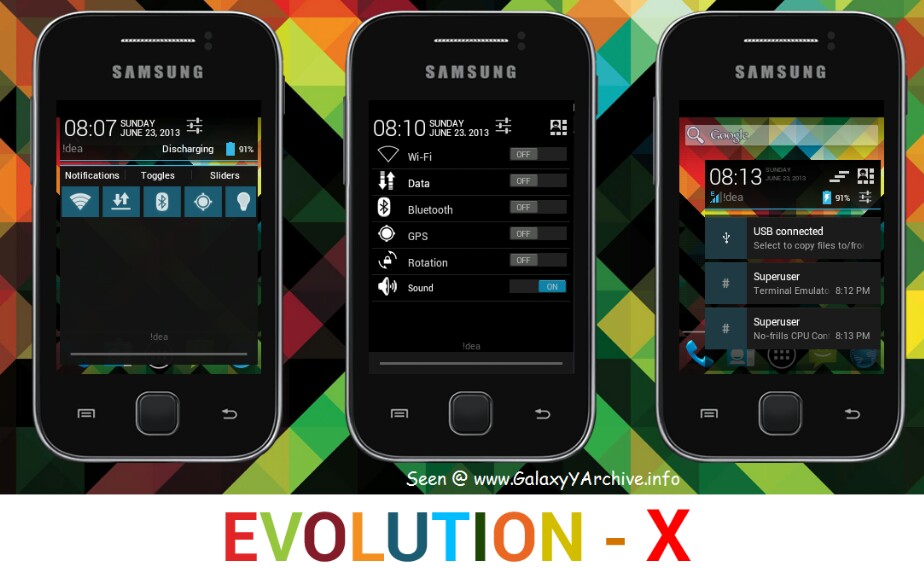
[ROM] Evo-X 4 for Samsung Galaxy Y

To the fans of the Evo-X rom series by b16h22 from xda-developers forums,
version 4 is now out. With more
preferences added, improved system
apps and a few other features and
improvements.

Changelog:
1. New evo preferences
2. Change statusbar
    layout between
    normal/pseudo-
    phablet/pseudo-
    tablet view
3. Sliders control
4. Set any color and
    transparency for
    statusbar
5. Set any color and
    transparency for
    notification pulldown
    background
6. Show/Hide battery in
    pulldown
7. Three panels in
    phablet view
    including notification,
    quicksettings,slider
    controls
8. Two panel view
    (android 4.2) in
    normal and tablet
    layout
9. Aokp look-alike 6
    toggles with show/
    hide option
10. Hide/Show, color
      clocks in both
      expanded and
      statusbar
11. Show/hide day of
       week in expanded
12. Change color of
      quicksettings toggles
13. Change color of
      quicksettings text
14. Set user display
       picture and name
15. Hide/show 15 toggles
16. Show/hide slider
       controls
17. New messaging app
18. New contacts app
19. New calendar app
20. New myfiles app
21. Better phone.apk
22. Better dialer
23. New music player
24. Holo launcher
25. Better settings app
26. Better Gmail app

Download - Click here

Instructions:
1. Download the zip file to your
sdcard
2. Power off your phone and boot
into Recovery mode
3. Boot into CWM Recovery
4. Wipe data and cache
5. Go to install zip from sdcard
6. Select choose zip rom sdcard
7. Locate the zip and choose it
8. Choose Yes to confirm
9. After installation is complete, go
back, wipe cache and data again
10. Reboot

Source:
http://forum.xda-developers.com/
showthread.php?t=1757125

Screenshots:-

Read More

Tuesday, 23 July 2013

// // Leave a Comment

[ROM] Hyperion 8 Project 2013 for Galaxy Y

JellyBean experience at its best
Everything you love about Hyperion
and JellyBean — the gorgeous UI , fast
and fluid performance, battery life —
is everything you’ll love about the
new Hyperion, too. And you can have
the best of both it in one ROM.
A rom worthy of all Galaxy Y

Fast performance, superb stability,
mouth watering UI, useful features —
It's something for everyone. And
Everything!
Incredible performance
Known for its fast, fluid performance,
Hyperion doesn’t disappoint. It
features 23 powerful and power-
efficient CPU governors and 4 I/O
Scheduler, which makes everything
you do feel smooth and natural.

Hyperion wouldn’t be Hyperion
without incredible battery life . Even
with so much performance packed
into such a small space, it still lasts
up to 2 days on a single charge* .
So you can read, watch, play, write,
and create whatever you want, as
long as you want. *battery life
based on moderate usage with all
radios turned on at default policy
settings.

Hyperion 8 highlights:
Total ear-gasm: ALSA ( AlsaProject)
+ Beats Audio Engine v2
We combined and tuned up two
sound engines for superb sound
quality when listening to music. This
time, sound enhancements are
activated at startup without the use
of DSP Manager. What does that
mean? No more force close when you
connect/disconnect mass storage
mode on PC.

Mouth watering pixel goodness
Like JellyBean looks but sluggish like
old granny? Worry no more! Hyperion
8 combines JellyBean UI and
transparency into a piece of art. We
don't simply take frameworks,
systemUI and put it in a blender. We
make sure we put "what belongs
together"

Project butter Hyperion style
We combined all the best tweaks out
there for a superb super smooth UI.
Others would say "No! That's not
real! Project butter is JB only", yes
that is correct if you can't read
between the lines.
More juice more fun!
We hate running out of juice as much
as you do, so we made sure you can
get the most of your battery. We put
23 CPU governors and 5 IO schedulers
to tame that nasty CPU! And with
deep sleep? Your phone will get more
sleep than you do! -well at least for
me this is a true statement.

Features:
Basic - all custom roms must
have:
1. De-Odexed
2. Zipaligned
3. Recompressed APKS
4. Optimized APK Images
5. Rooted
6. BusyBox and BusyBox run-parts
support
7. Apps2SDenabled
Common - though not working in
other roms:
1. 15 Toggle Notification Drawer
2. 6 Lockscreens from Gingerbread
AOSP/CM with custom app
starter and gesture unlock
3. Status bar Tweaks + TEAM
battery bar
4. 4-way Reboot Options
5. Expanded Power Menu (because
themers and mods crash
systemUI most of the time, we
need other ways of rebooting)

Unique - not all custom roms
have:
1. No SMS Bug
2. No false Android version
3. No useless features
4. Least branding (Like creed parts
or cod parts or whatever. We
don't like that. It's your phone,
not ours)

Advanced:
1. EXT4 File System Support
2. CIFS
3. Swap Support
4. BaCeM Tweak
5. UnderVolt Support
6. Firewall Support (DroidWall Open-
Source Project)
7. Ad-blocking host file

Plus - only Hyperion:
1. Supercharged Hyperion Core v2
with Adrenaline Engine v4.4
2. Transparent JellyBean user
interface
3. Ear-gasmic sound quality
4. Integrated Autostart manager,
Firewall and Network Unlocker
5. Modular system structure
6. System Replacer

Experimental:
1. Force GPU Rendering - Force
use of GPU for 2D rendering
2. Disable HW overlays - Always
use GPU for screen compositing
3. Allow purging of assets -
Purging of bitmap memory assets
allows freeing of more RAM when
needed (you can now get as low
as 85-90mb used RAM)
4. 32bit transparency - Better
graphics performance and full
transparency support

Download ROM - Click
here.

Installation:
1.Boot into CWM recovery - Don't
have it? Click here to
download.
2. Go to mounts and storage
3. Mount /system
4. Mount /data
5. Mount /sdcard
6. Select wipe dalvik-cache from
advance and debugging
7. Select wipe battery stats from
advance and debugging
8. Select wipe data/factory reset
9. Select wipe cache partition
10. Finally, choose install zip from
sdcard
11. Then choose select zip from
sdcard
12. Locate the rom zip file in your sd
card and choose it, then choose
Yes
13. After it's done, press the back
button once and choose reboot
system now (it should be first
option)

Credits:
Hyperion Project 2013
In cooperation with:
iDUMMY
pollube31
OZAWA LAB - mariozawa
Carl's Android Kitchen -
CarlDeanCatabay

Read More
Older Posts Home